
Although Instagram doesn’t support video downloads, users can still easily download IG videos to their phones using third-party tools like Savegram.info, requiring only the video link or username of the account they want to download from. This article will guide you through downloading Instagram videos for iPhone, Samsung, Xiaomi phones, and more without installing any apps.
Guide to Downloading Instagram Videos on iPhone
If you’re using an iPhone and want to save impressive videos from Instagram, don’t miss the online tool Savegram.info.
Note that iOS 13 and later versions support downloading and saving videos directly from Safari browser, so you don’t need to install third-party apps. Savegram works completely free and doesn’t require logging into your Instagram account.
Step 1: Copy the Link from Instagram
First, you need to get the link of the Instagram video you want to download. This is an important step for the Savegram system to access the correct content.
- Open the Instagram app
- Find the Instagram video you want to download – it could be a post from friends, celebrities, or public pages
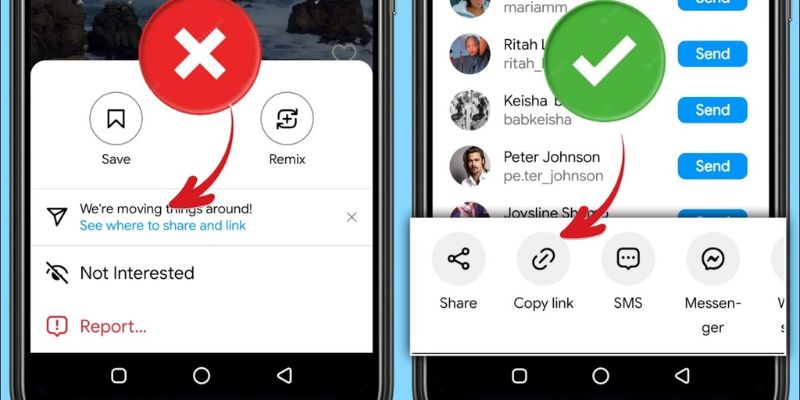
- Tap the three vertical dots icon in the top right corner of the post
- From the menu that appears, select “Copy Link”
- Once completed, the video link is saved to your phone’s clipboard and ready for the next step
Step 2: Access Savegram Website
Next, you need to use the web browser on your iPhone to access the Instagram video download tool.
- Open Safari browser
- Enter Savegram.info
- The Savegram homepage has a simple, easy-to-use interface where you’ll see a link input box to start downloading videos
Step 3: Paste Link and Download
Once you’ve accessed Savegram, proceed to paste the Instagram video link copied in Step 1.
- Tap the input box and paste the link on the Savegram page
- Press the download button right next to the box where you just pasted
- The Savegram system will process the link in a few seconds and display the video with a Download button
Step 4: Save Video to iPhone
You can find the downloaded video in the Files folder. Then you can continue to save the video to your phone’s photo library for convenient viewing.
Read more:
- 5 best Instagram video download tools
- How to download Instagram videos to computer
Guide to Downloading Instagram Videos on Android Phones
For Android users, downloading Instagram videos to phones becomes extremely simple when using Savegram, a free online tool that doesn’t require app installation.
You can share videos directly from the gallery or file app without reopening Instagram. Savegram doesn’t require an account, contains no annoying ads, helping you download videos safely and securely.
Step 1: Copy Link from Instagram
First, you need to get the URL of the Instagram video you want to download.
- Open the Instagram app
- Find the Instagram video you want to save to your device
- Tap the three vertical dots icon in the top right corner of the post
- Select “Copy Link”
- Once you copy it, the link will be saved to clipboard and ready for the next step
Step 2: Access Savegram.info
Next, in this method of downloading Instagram videos to Android phones, open the web browser on your phone. You can use Chrome, Samsung Internet, Firefox, or any other browser.
- Enter the address Savegram.info
- The homepage interface will appear with a box for you to paste the Instagram video link you need to download
Step 3: Paste Link and Download
Once you’re on the Savegram website, follow these steps:
- Tap the input box to paste the Instagram link, select paste to insert the link you just copied
- Then, click the download button and wait for Savegram to analyze the link and return the formats and video qualities you can download
Step 4: Download Video to Device
When Savegram’s analysis results display, you just need to:
- Click the “Download” button corresponding to your desired video quality
- The browser will start downloading the video to the download folder or a default folder depending on the browser you’re using
- After downloading is complete, you can open the video with Video Player, Google Photos, or your phone’s file management app
Read more: Best Instagram downloaders
Other Methods + Tools to Download Instagram Videos to Phone
Besides Savegram, there are many other online tools to download Instagram video to phones like Snapinsta, Snapsave, Savefrom. These are all reputable tools used by many people to download videos safely.
Additionally, users can also use mobile applications to download IG videos. The advantages of IG video download apps are fast downloading, good quality, plus many supporting features like video sharing, reposting videos to other platforms, and convenient download file management.
Disadvantages of Instagram video download apps on mobile:
- Takes up phone storage space
- Logging into IG through another platform risks account loss
- Apps often have long ads that annoy users
- App stores are very strict with apps that have bad intentions; Instagram video download apps are often considered to aid copyright infringement and are easily shut down
Mobile Video Download Apps
For iPhone:
- InstaSaver Download Instagram Videos
- Instadp – Download Instagram Videos
For Android:
- Video Downloader – Story Saver
- InstSaver: Video Downloader
- Snapinsta: Video Downloader
- Insget – Video & Story Saver
Conclusion
With the Savegram.info tool, downloading Instagram videos to iPhone or Android phones becomes simpler. Whether you want to preserve beautiful moments, tutorial videos, or entertainment content, Savegram is always a quick, convenient, and safe choice.